Coming soon for all organizations reporting under IFRS is a new standard called Presentation and Disclosure in Financial Statements that is going to be a replacement for IAS 1. If you operate under Canadian ASPE or US GAAP these changes won’t impact you but it’s still important to note what is happening under the IFRS accounting framework. There are big changes coming to how organizations disclose financial information on the income statement, specifically several newly required categories. These changes are also coming quick and will be in effect January 1st, 2027 with retroactive requirements going to January 1st, 2026, and I haven’t seen anything from Microsoft acknowledging these changes as of the date this post was published.
If you’re a finance team operating a company that follows IFRS you need to start planning out how these changes will impact your business. Hopefully this post can give you some ideas or at least provide you with information to help you manage IFRS 18 in Business Central.
Main Changes Under IFRS 18
IFRS 18 is a big change and necessary as the changes provide important disclosure requirements and give anyone reviewing audited financial statements more information. Some of the key differences when looking at IFRS 18 includes:
Five Defined Categories and Mandatory Subtotaling in the P&L
There are some changes coming to the income statement that require transactions to be grouped into the following categories:
- Operating: This category contains all income and expenses not required in the other four categories. It captures main business activities and supporting operational activities.
- Investing: Meant to capture specified income and expenses from assets that generate returns individually and largely independently (e.g. think rental income, investment income, interest income, dividends). As well, it includes specified income and expenses from equity-accounted associates, joint ventures, and unconsolidated subsidiaries, as well as cash and cash equivalents. This means income or loss from equity-accounted associates and joint ventures need to be taken out of operating profit and brought into the investing category.
- Financing: Differentiates between Type 1 Liabilities (arising solely from raising finance, where all measurement changes go to Financing) and Type 2 Liabilities (arising from other transactions like IFRS 16 lease liabilities or IAS 37 provisions, where only interest expense and discount rate changes go to Financing).
Mandatory subtotaling includes Operating Profit or Loss and Profit or Loss Before Financing and Income Taxes.
Management-Defined Performance Measures
Another change that is being introduced in IFRS 18 is governance over non-GAAP performance metrics. Specifically, what is being introduced is Management-defined Performance Measures (MPM) which is defined as the subtotal of income and expenses that are used in public communications outside of the financial statements. This could mean a press release or investor presentation. There now needs to be a note in the financial statements and this note needs to include the following:
- Explanation of the why the measure provides useful information.
- How is it calculated.
- A reconciliation of the subtotal.
- The non-controlling interest and income tax effect impact for reconciled items.
Aggregation, Disaggregation, and Expense Presentation
One of the last big changes is the rules governing grouping of items based on share characteristics and “ungrouping” or disaggregation of items that don’t share characteristics. There is a new disclosure mandate that you must disclose in a note the total amounts for five natures of expenses:
- Depreciation
- Amortisation
- Employee Benefits
- Impairment Loss under IAS 36
- Inventory Write-downs
How Does This Impact Business Central?
Right out of the gate it should be noted that while Business Central is a highly flexible system with a lot of configuration options, there are limitations when trying to implement IFRS 18, especially around the categorization changes.
Issue 1: G/L Account Structure
Business Central has six static categories assigned to G/L Accounts which are Assets, Liabilities, Equity, Income, Cost of Goods Sold and Expense. These can’t be changed in a default configuration. There isn’t a category to separate Operating, Investing, or Financing. Now you could simply just have a G/L Account or Subcategory in some cases, but many organizations are going to have a mix of these inside one G/L Account.
Issue 2: Financial Report Layouts
Business Central utilizes column and row definitions to generate financial statements. These typically are generated based off the G/L Account Subcategories, but a G/L Account can only be assigned one static category and a single Subcategory. This is effectively a continuation of the G/L Account Structure issue as when creating financial reports in Business Central, we can’t split amounts within a G/L Account up which is required under IFRS 18. You may be thinking of using Dimensions but lets not jump to far ahead. A lot of organizations don’t have dimensions built for IFRS 18 yet.
Issue 3: MPM Requirements
Business Central doesn’t have a standard mechanism to track non-GAAP adjusting entries. There are certainly work arounds and options but out of the box you may not be prepared for MPM.
What to Do?
Under Issue 2 you may be thinking that this can be solved with some standard functionality such as Subcategories or Dimensions. Now, if you’ve been using Business Central for a few years you most likely didn’t plan for an IFRS 18 dimension which is the crux of the problem. Here is what you can do to address some of the IFRS 18 requirements.
G/L Account Categories
If your G/L Accounts have clear purposes and aren’t multi-use for IFRS 18 categories, you can modify or create new G/L Account Subcategories (you can really name these whatever you want but for example purposes I’m using the below subcategories):
- IFRS18_Operating
- IFRS18_Investing
- IFRS18_Finance
These could either be entered as Subcategory headers with other subcategories below them:
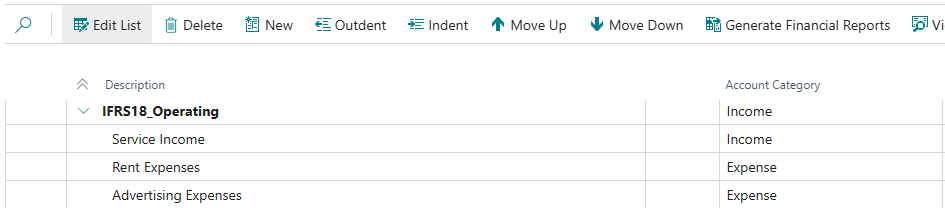
Or individual categories themselves could be renamed to identify the type of IFRS 18 category it is:

From the G/L Account Categories page you can create new Financial Report layouts with the click of a button and have your categories split based on the setup above:

Financial Report definitions can even be modified further where you can add additional rows or descriptions. This is where we would want to ensure report subtotals are managed and added.
Dimension Changes
Using Dimensions is my preferred method of managing IFRS 18 categories. If you have a mix of activities in an account or you simply don’t want to change your G/L subcategory structure, you can create a Dimension called IFRS18 and create the following values (similar to above, use appropriate naming, I’m using the below for example purposes):
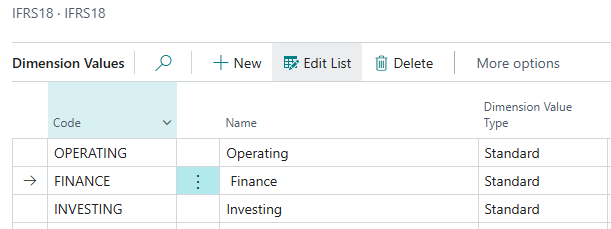
These can be set as mandatory on key G/L Accounts. In many cases you could have FX gains and losses with a mix of activities. Code Mandatory dimensions can be set on these accounts.
This approach is highly flexible because you can take transactions posted to the General Ledger and use dimension corrections to update the IFRS 18 value if needed. In the example below I have older transactions with no IFRS18 code:
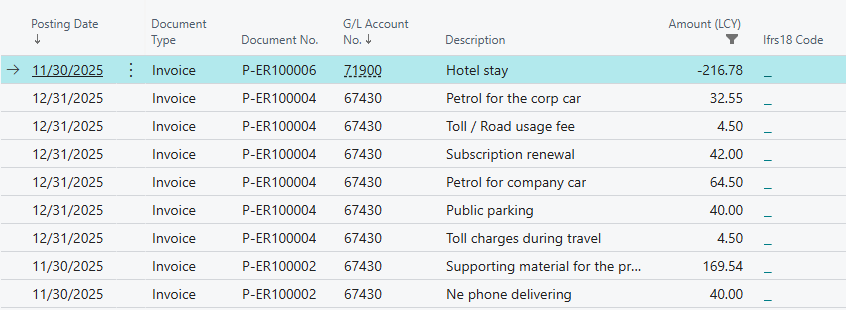
But with dimension corrections I can easily change that:
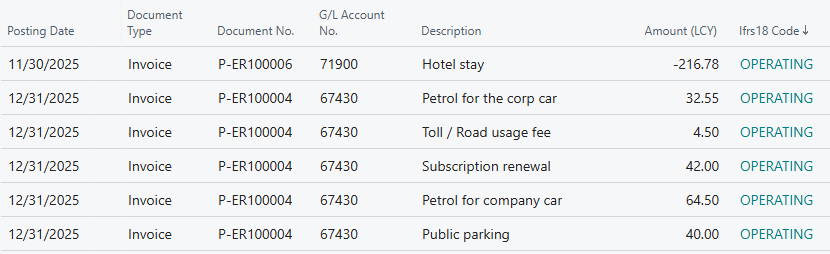
This gives you the ability to apply IFRS 18 categories to older transactions and make sure you have consistent reporting across periods.
And even better, with the current version of business central you can run exchange rate adjustments and use the source entry dimensions:
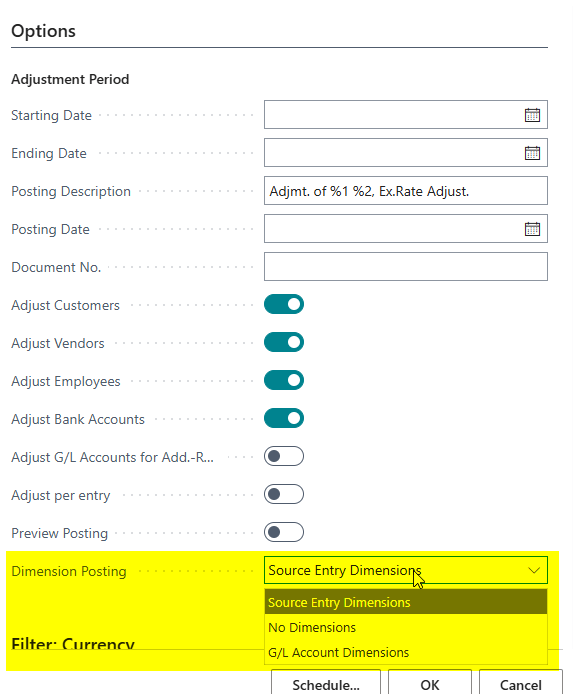
Just like that you have an easy way to categorize transactions by IFRS 18 categories. With the added benefit that you can also add dimension values to expand on the categorization and aggregate or disaggregate transactions. If your IFRS 18 dimension is a global dimension it can also be used as a filter on column and row layouts in financial reports. Otherwise, you can get the detail out of the general ledger and build reports using Power BI or another tool.
What About Non-GAAP Measures?
The calculation of Non-GAAP Measures or MPM can actually be added into Business Central using statistical accounts. The calculation may be external, but this data can all get into the system.
Let’s take an example of Adjusted Operating Profit as an MPM where goodwill impairment and severance costs are added back into operating profit. This information can be added as a simple statistical account with a description and backup information. Below is an example with a note:
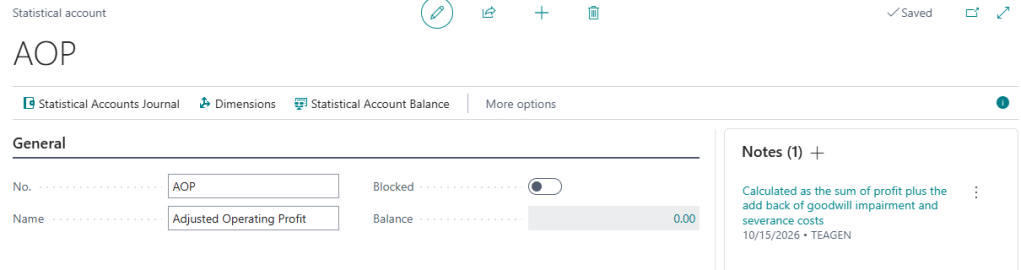
It’s also a good thing to remember you can use a dimension and assign it to this statistical account, and you don’t even have to assign this dimension to a shortcut dimension in the general ledger setup. It can be used for information purposes in the setup.
After setup, statistical journals can be posted, and this account can be added to any row definitions for financial statements in Business Central:
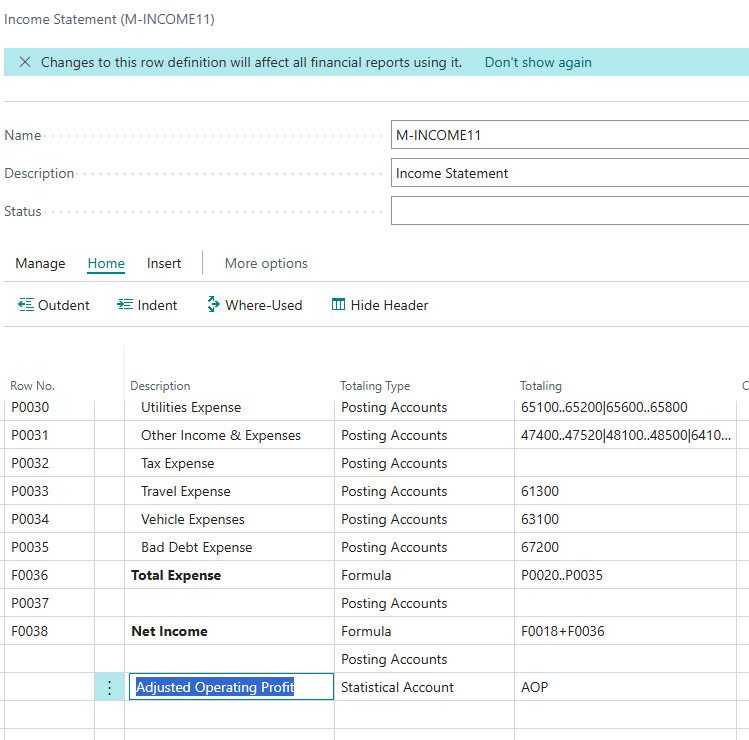
Separate Row definitions can be made for financial statement layouts where these non-GAAP measures are required. And in the newest versions of Business Central additional introductory paragraphs and closing paragraphs can be added to financial statements explaining measures such as Adjusted Operating Profit:
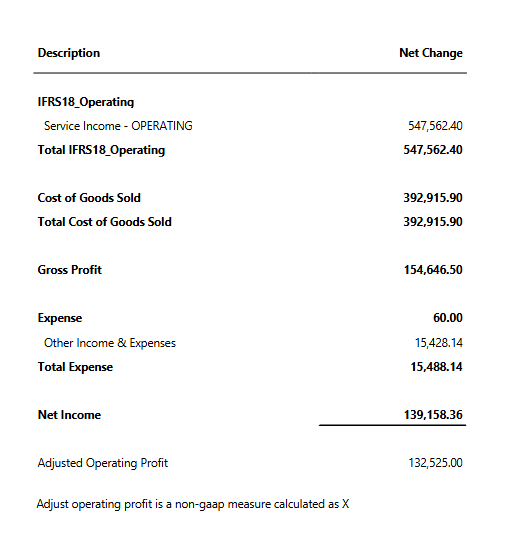
These may not end up being your full audited and signed off financial statements, but this is a quick way to ensure all the required information is captured in Business Central.
Summary of IFRS 18 versus IAS 1
While I didn’t cover every change, below summarizes some of the topics discussed in this article:
| Reporting Requirement | IAS 1 | IFRS 18 | Business Central Fix |
|---|---|---|---|
| P&L Structure & Categories | No defined categories; operating profit optional and inconsistently defined. | Mandatory categories such as Operating, Investing, and Financing Required. | Modify your Account Subcategories or implement a new IFRS 18 dimension. |
| Mandatory Subtotals | Only profit or loss and comprehensive income required. | Mandatory to disclose operating profit, profit before financing and tax and Net profit. | Use Financial Report row definitions to total as required. |
| Non-GAAP Measures | No mandatory audit notes required. | Audited note disclosure and reconciliation required. | Add note disclosures in BC and ensure statistical accounts are created and can be linked to transactions. |
Closing Thoughts
You don’t want to wait till 2027 in order to make sure you are compliant with IFRS 18. There is a requirement under IFRS 18 for full retrospective application meaning that 2026 comparatives must be restated. These changes can start now and with just a few configuration changes and some pro-active report development you can be ready for the restructuring of financial statement changes that are being introduced with IFRS 18. Taking a proactive approach will save time and allow finance teams to test and validate prior to these changes being implemented. If you’re a consultant or on a team that operates under IFRS you shouldn’t be scared but you should be thinking about these changes. Hopefully this article has given you some ideas of just what can be done to manage IFRS 18 changes. If you ever want to learn more about financial report layouts you can reference some great documentation from Microsoft here: Build financial reports using financial data and account categories – Business Central | Microsoft Learn


Leave a Reply