The BC Lease Gap
One common gap that we see with Dynamics 365 Business Central (BC) is with finance and operating leases. There isn’t a lease module available out of the box for Business Central. In historical scenarios for operating leases you used to be able to simply just take a lease obligation and keep it off the balance sheet, then record the monthly expense. Simple and easy. But as changes are made to accounting frameworks such as with IFRS 16 and ASC 842 – Leases, there is a requirement to bring even operating leases into the balance sheet. Some of these leases could be for thousands or even millions of dollars. In this article I want to explore a few ways to manage these leases from a lessee’s perspective without looking at costly apps for Business Central.
Operating versus Finance (Capital) leases
This article is going to explore both types of leases for lessees. An operating lease is similar to a rental agreement. The lessor or who owns the asset keeps ownership and risk. This is different from a finance lease where ownership and risk transfers to the lessee over the term. In order for a lease to be considered a finance lease it needs to satisfy the any of the following below conditions. Under ASC 842 there are 5 criteria and ASPE 3065 there are 3 criteria:
- The asset must transfer to the lessee.
- There must be a bargain purchase option. (this point and the point above are a single criterion under ASPE)
- The lease term must be equal to or greater than 75% of the assets remaining useful economic life.
- Present Value of the lease payments must be greater than or equal to 90% of the assets fair market value.
- ASC 842 only: The asset itself is specialized and has no alternative uses.
Under IFRS, operating and finance leases are not distinct. They need to always be recorded on the balance sheet, and they need to have a depreciation expense and interest expense on the income statement.
Technical Comparison Between ASPE 3065, IFRS 16 and ASC 842
There are some similarities between IFRS and US GAAP, but when it comes to ASPE there are significant differences. As with other standards ASPE takes the approach where implementation is simpler. It’s still important to understand the differences between each framework and how they need to be implemented in any ERP. Below is a comparison between each framework for both Operating and Finance (Capital) Leases.
Operating Leases
| Operating Lease Feature | ASPE 3065 – Leases | IFRS 16 – Leases | ASC 842 – Leases |
|---|---|---|---|
| Initial Measurement: Balance Sheet Impact | No balance sheet impact, no liability or asset recorded. | Debit: Right-of-use (ROU) asset Credit: Lease liability | Debit: Right-of-use (ROU) asset Credit: Lease liability |
| Subsequent Measurements: Lease Payment | Debit: Rent Expense Credit: Cash/Accounts Payable | Debit: Lease Liability (reduction of principal) Credit: Cash/Accounts Payable | Debit: Lease Liability (reduction of principal) Credit: Cash/Accounts Payable |
| Subsequent Measurements: Lease Expense and Amortization | Not applicable as there is no ROU asset. | Debit: Lease Expense Credit: Lease Liability (interest component) Credit: Accumulated Depreciation – ROU Asset | Debit: Lease Expense Credit: Lease Liability (interest component) Credit: Accumulated Depreciation – ROU Asset |
| Expense Recognition | The expense is typically a flat and straight-line amount over the term. | The lease costs are front loaded with higher interest recorded in earlier years. | Similar to ASPE the expense portion is typically a straight-line amount over the term. |
| Short-term Leases | The lease is expensed similar to standard operating expenses. | A policy choice can be enacted to exempt short-term leases under 12 months from IFRS 16. | Similar to IFRS 16, ASC 842 has optional policy enactments that allow for exemptions for leases under 12 months. |
| Low-value Leases | There are no exemptions related to lower value leases. | An exemption can be made for leases that are 5,000$ or less. | There are no exemptions related to lower value leases. |
As you can see in the table above, this is one topic where there is a bit of a mix of overlap between the different standards. ASPE has the simplest implementation, but ASC 842 is closely aligned with IFRS 16.
Finance (Capital) Leases
| Finance (Capital) Lease Feature | ASPE 3065 – Leases | IFRS 16 – Leases | ASC 842 – Leases |
|---|---|---|---|
| Initial Measurement: Balance Sheet Impact | Debit: Capitalized Lease Asset Credit: Lease Obligation ROU asset recorded at lower of present value of minimum lease payments or fair value of leased asset | Debit: Right-of-use (ROU) asset Credit: Lease liability | Debit: Right-of-use (ROU) asset Credit: Lease liability |
| Subsequent Measurements: Lease Payment | Debit: Lease Liability (reduction of principal) Credit: Cash/Accounts Payable | Debit: Lease Liability (reduction of principal) Credit: Cash/Accounts Payable | Debit: Lease Liability (reduction of principal) Credit: Cash/Accounts Payable |
| Subsequent Measurements: Lease Expense | Debit: Interest Expense Credit: Lease Liability | Debit: Interest Expense Credit: Lease Liability | Debit: Interest Expense Credit: Lease Liability |
| Subsequent Measurements: Depreciation Expense | Debit: Depreciation Expense Credit: Accumulated Amortization – Lease Asset | Debit: Depreciation Expense Credit: Accumulated Depreciation – ROU Asset | Debit: Depreciation Expense Credit: Accumulated Depreciation – ROU Asset |
| Expense Recognition | The lease costs are front loaded with higher interest recorded in earlier years. | The lease costs are front loaded with higher interest recorded in earlier years. | The lease costs are front loaded with higher interest recorded in earlier years. |
| Short-term Leases | The lease is just expenses similar to standard operating expenses. | A policy choice can be enacted to exempt short-term leases under 12 months from IFRS 16. | Similar to IFRS 16, ASC 842 has optional policy enactments that allow for exemptions for leases under 12 months. |
| Low-value Leases | There are no exemptions related to lower value leases. | An exemption can be made for leases that are 5,000$ or less. | There are no exemptions related to lower value leases. |
In the case of Finance (Capital) Leases, all frameworks are closely aligned in terms of initial recognition and subsequent measurement.
the BC Fixed Asset Approach: Implementation without Costly Apps
In Business Central one of the simplest ways to setup a lease is to use fixed assets. Under IFRS 16, ASC 842 and ASPE 3065 (for capital leases) an ROU asset is required on the balance sheet and with Business Central we can also leverage dimensions. The steps below outline how you can go about using standard BC features to record operating leases.
Step 1: Set up the ROU Asset Posting Group
In Business Central you will need a dedicated fixed asset posting group. I recommend creating a specific ROU-LEASE posting group (or more than one if you want to categorize these leases). Under IFRS 16 and ASC 842 the ROU assets must be disclosed separately on the Balance Sheet from regular Fixed Assets. For ASPE this just applies to Capital Leases and with ASPE you need to make sure to use the correct terminology as it differs from IFRS and US GAAP. ASPE uses Capitalized Asset and Lease Obligation instead of ROU Assets. I recommend a setup like below:

| FA Posting Group Field | G/L Account | Name | Classification |
|---|---|---|---|
| Acquisition Cost Account | 19100 | ROU Lease Asset | Balance Sheet Long Term Asset Account for ROU Assets |
| Accum. Depreciation Account | 19200 | Accum. Amortization – ROU Asset | Balance Sheet Long Term Asset Account for ROU Assets |
| Depreciation Expense Acc. | 61500 | ROU Asset Expense (Lease Expense) | Operating Expense Account |
| Acquisition Cost Bal. Acc. | 24100 | Lease Liabilities – Long Term | Lease Liability Account for Long Term Liabilities |
Business Central standard FA Posting Groups also typically are configured so that the balancing account itself is a Bank or Payables account, as in your purchase an asset from a vendor or pay for it from a bank account. Under this setup we are posting the credit to a long-term liabilities account. It’s also important to setup an additional account for the Current portion of the Lease Liabilities. In my example I will use the following account:
G/L Account No. – 24050 – Lease Liabilities – Current
Step 2: Lease Dimension Setup
After setting up the posting group, you will want to setup a Lease Dimension as a shortcut dimension. Simple enough, just configure a new Dimension called “Lease” and assign it as a dimension under the General Ledger Setup:
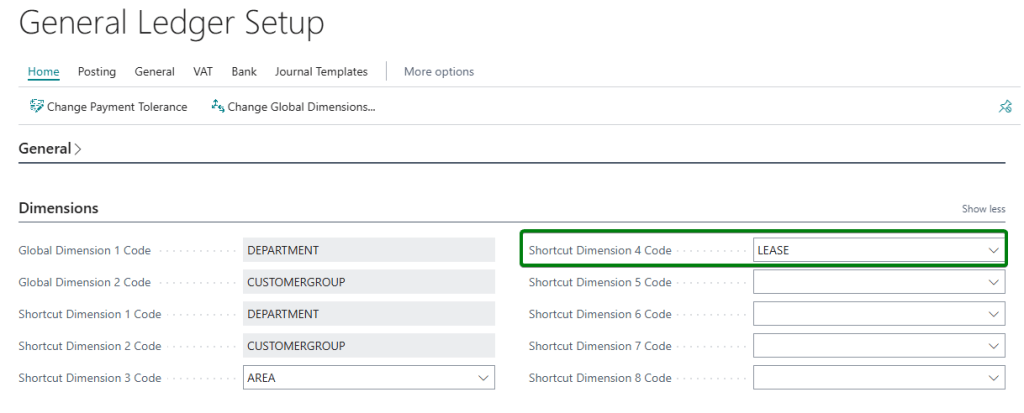
Step 3: Setup an ROU Asset and Dimension Value
First setup the Fixed Asset card for your lease. I recommend also having a Class Code and Subclass Code for ROU Assets. I’ll setup a lease for an office at 5 years:
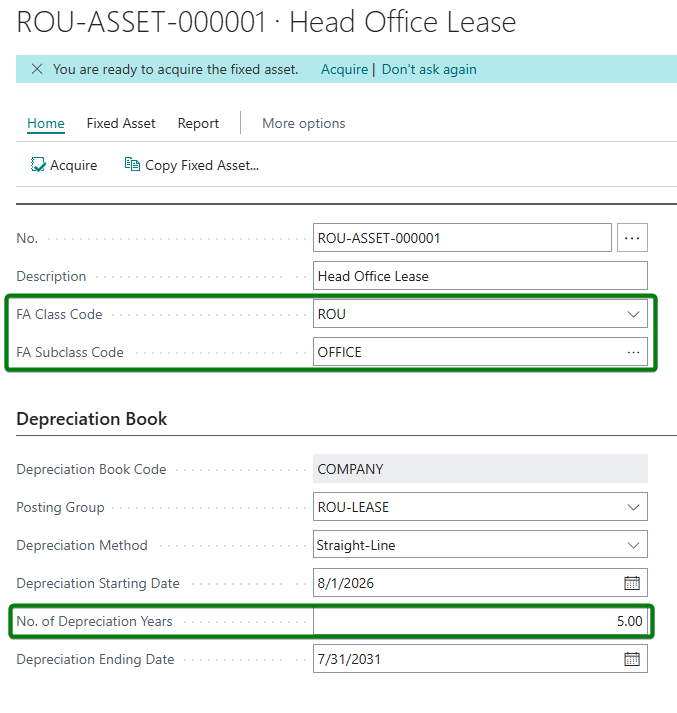
In addition, I am going to setup a dimension value for that Lease and then assign that dimension value to the fixed asset to assist with reporting, you can even set it as SAME CODE to enforce rules around postings and to help ensure your audit trail will be accurate:
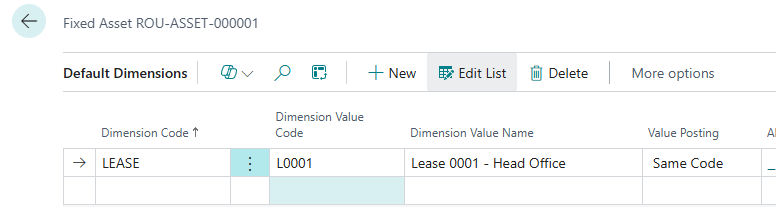
I would also recommend on the Balance Sheet to set your Long Term and Current Liability accounts be set with dimension value posting as Code Mandatory to also enforce restrictions.
Step 4: Acquire your ROU Asset
For initial recognition of your lease asset under all frameworks for Finance Leases and under ASC 842 and IFRS 16 for operating leases, we need to calculate the present value of future lease payments. This step needs to be done in excel. You can use simple present value calculations to derive this value and generate an amortization schedule. In my example I have a simple present value calculation and an amortization calculation:
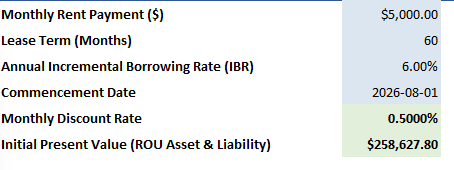
For my lease, at a 5,000$ monthly payment over 60 months, with a discount rate of 6% annually, I have a calculated present value of 258,627.80$. This will be the number we use for our initial recognition. An example of my amortization schedule can be seen below:
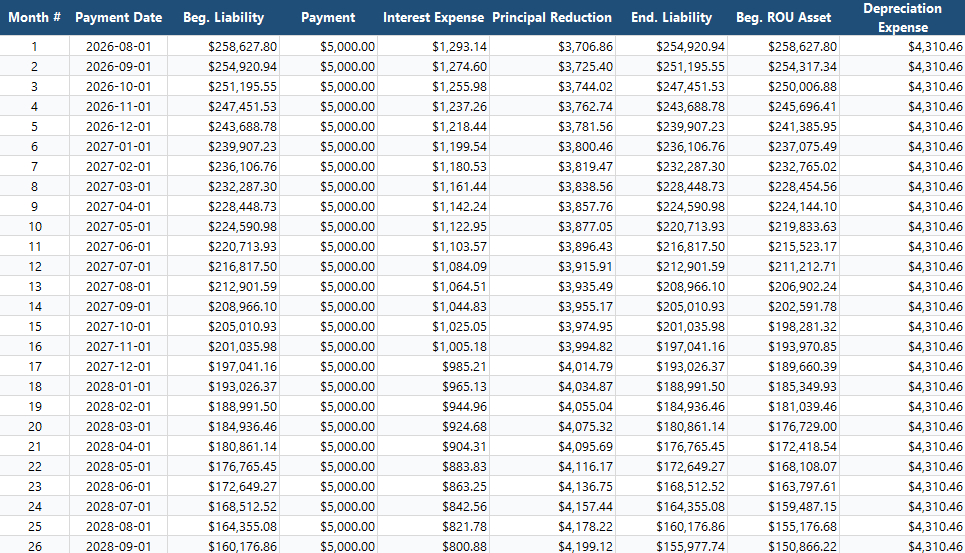
Another important note for ASPE Capital Leases, ASPE 3065.16 “requires lessees to use the lower of the incremental borrowing rate and the implicit rate if practicable“. IFRS 16 just uses the rate implicit in the lease.
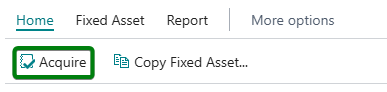
It’s easy enough to acquire an asset in Business Central. This can be done using the Acquire asset wizard on a fixed asset which can be found under Home > Acquire:
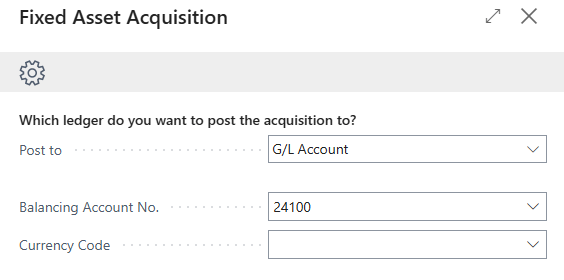
You just need to set the balancing account as your Long-Term Lease Liabilities account:
Then set your acquisition cost and date as the present value of the lease and the commencement date of the lease:
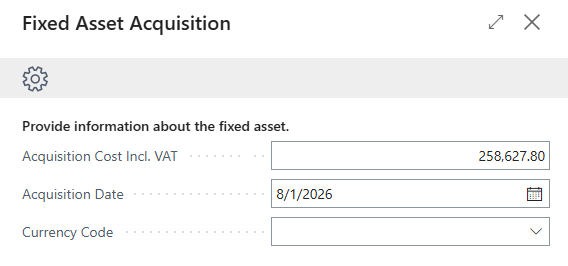
Finish reviewing and posting that journal. You’ll have to make sure to apply that lease dimension value to the lines of the Fixed Asset G/L Journal. The journal and the acquisition are the exact same for operating and finance leases. Under ASPE you would also need to calculate the fair market value of the asset being leased. The lower amount of the minimum lease payments and the fair market value is used under ASPE 3065.
Step 5: Allocation of Current Lease Liability
The lease liability account on the balance sheet can then be split between the current and long-term portion. You can use an amortization schedule to assist with calculating what the current portion will be. Below is an example of the above amortization schedule using the present value numbers with the principal amortization column highlighted to get the current portion of the liability over the first 12 months.
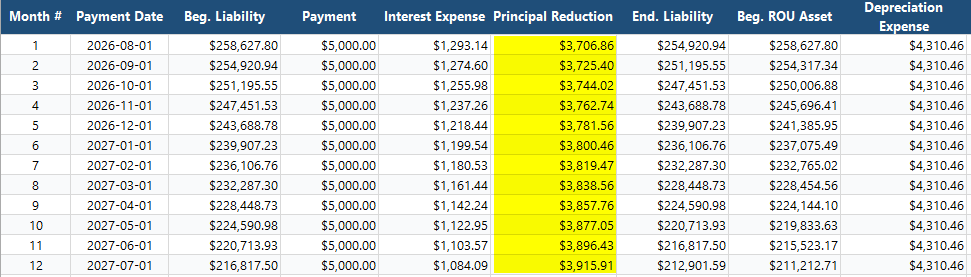
In total the measurement for our current liability will be 45,726.21$. This can be recorded using a Recurring Journal (which I recommend creating a LEASE batch for) set with a recurring period of 1 year, a posting date of the commencement date, the G/L Account for the long-term liability and an expiration date equal to the term. I also recommend having the Lease dimension value code on the line:

- I recommend creating a batch specifically for leases.
- Set the recurring method as variable as the amount will fluctuate each year.
- Set the recurring frequency as 1Y because the current liability amount to be recognized will be recorded on a yearly basis.
- The G/L Account should be for your long-term liability account for leases.
- The amount is the sum of the 12 months calculated in the amortization schedule.
- The expiration date of this journal line is 5 years in the future.
- The dimension value required for the lease is entered on the line.
This journal can then be fully allocated to the current liability account within that journal. The posting for the journal will be as follows:
Debit: Lease Liabilities – Long term
Credit: Lease Liabilities – Current
Once posted then the subsequent measurement entries can be entered next.
Step 6: Monthly Subsequent Measurement
On a monthly basis (or annual), there will need to be a journal recorded for both types of leases under each framework. What will be important is under our amortization table that we focus on these numbers – our Monthly Payment, our Interest Expense, our Principal Reduction (amortization) and our Depreciation Expense amount:
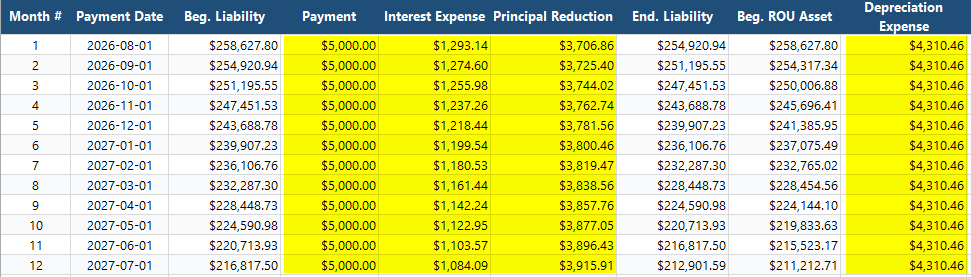
Depending on the type of lease we will also have to determine the journal entry to be created which i’ve split into an operate lease example and finance lease example below.
Step 6a: Monthly Journal Entry for Operating Leases
As outlined in the table above. We need to record a monthly (or annual) journal entry. The simplest way to do this is to also use a recurring journal entry in Business Central.
The simple approach to this is to enter three lines. One line for the Lease Payment, a second line for the ROU Asset Expense (Lease Expense) for the month and a third line for the fixed asset depreciation:

Note: You need to personalize your role to add the FA Posting Type field to the recurring general journal in order for this to work.
- The lease payment is fixed as it will always be 5,000$ a month. The lease expense will be based off the principal reduction column and is variable each month. The depreciation is also variable and is a plug that is the difference between line 1 and 2 (payment and interest).
- The document no. is using one of my favorite BC features which is dynamic date values (%4 and %6). For other placeholder code values, you can use the reference below:
- %1 = The day number of the period posting date
- %2 = The week number of the period posting date
- %3 = The month number of the period posting date
- %4 = The month name of the period posting date
- %5 = The accounting period name of the period posting date
- %6 = The fiscal year of the period posting date
- On line 1 I am entering a reduction to my current liability for leases equal to the lease payment. On line 2 I am recording an entry to my ROU Asset Expense (Lease Expense) account. On line 3 I am using this journal to record my depreciation entry instead of using the fixed asset g/l journal.
- The amount for each line is calculated and presented as follows:
- Line 1 (The Cash Payment):
- Main Account:
24050 - Lease Liabilities (Current): Debit $5,000.00 - Allocation Account:
10100 - Cash / Bank: Credit $5,000.00 (100% Allocation)
- Main Account:
- Line 2 (The Lease Expense Accrual):
- Main Account:
24050 - Lease Liabilities (Current): Credit $1,293.14 - Allocation Account:
61500 - ROU Asset Expense (Lease Expense): Debit $1,293.14 (100% Allocation)
- Main Account:
- Line 3 (The ROU Asset Depreciation):
- Main Account:
Fixed Asset Card(ROU-ASSET-000001, FA Posting Type: Depreciation): Credit $3,706.86 (This routes to 19200 Accum. Amortization via the posting group) - Allocation Account:
61500 - ROU Asset Expense (Lease Expense): Debit $3,706.86 (100% Allocation)
- Main Account:
- Line 1 (The Cash Payment):
And just like that we have a full journal entry for our lease expense at month end ready to be posted, including the subledger entries for my fixed assets.
Step 6b: Monthly Journal Entry for Finance (Capital) Leases
In the case of a finance (capital) lease the process is similar to 6a above. We can use a recurring general journal to prepare our journal entry and change the G/L Accounts being used. The finance lease journal entry is actually a bit simpler than the operating lease entry. In our amortization schedule the Payment, Interest Expense and Depreciation Expense fields are important:
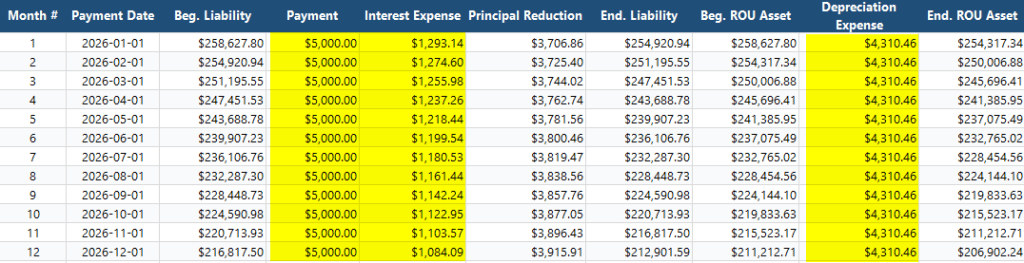
Then in our recurring general journal we can enter the lease payment and the interest expense:

Line 1 (The Cash Payment):
Main Account: 24050 - Lease Liabilities (Current): Debit $5,000.00
Allocation Account: 10100 - Cash / Bank: Credit $5,000.00 (100% Allocation)
Line 2 (The Interest Expense Accrual):
Main Account: 71800 - Interest Expense: Debit $1,293.14
Allocation Account: 24050 - Lease Liabilities (Current): Credit $1,293.14 (100% Allocation)
There is also a depreciation expense, but we can use standard BC depreciation calculations for this. In our fixed asset module just use the Calculate Depreciation function:

This will create the required depreciation entry for that lease asset for the month which aligns with our amortization schedule (ignore the decimal places for rounding).

Step 7: Reporting
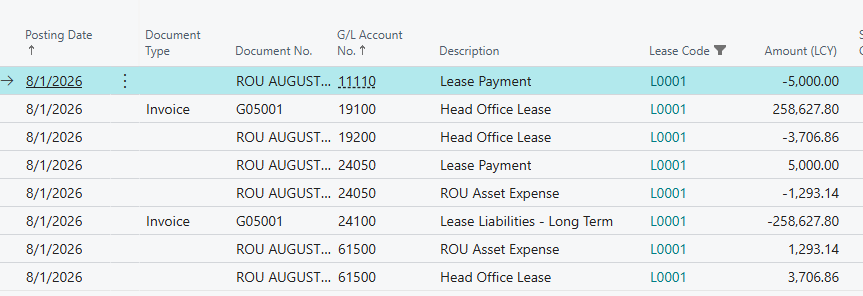
Now that you’ve posted the journal entries for an operating a finance (capital) lease. Next up you can use the Lease dimension in the general ledger or subledgers and create reports directly in Business Central using the analysis tools or send it to Power BI. The Lease dimension makes it very easy to filter, see what payments were made, track the current accumulated amortization, see what expenses were recorded and more:
What about ASPE Operating Leases:
As mentioned above, ASPE operating leases are the simplest to implement. These can be treated as standard rent expenses that can flow through your purchase module. Simply just enter invoices or even a basic purchase journal for the monthly expense and payment amount. You can still use dimensions on these entries for reporting purposes. You can also use a deferral schedule if you for example got an annual invoice and want to recognize the costs on a monthly basis.
Closing Thoughts
Ultimately, lease accounting is not simple, and it requires an accurate G/L based process to be tracked correctly. While third-party AppSource extensions are essential for enterprise portfolios with hundreds of leases, this native Fixed Assets and Dimension workaround proves that corporate Controllers can achieve full compliance under ASPE, IFRS, and US GAAP with standard Business Central tools. By implementing rigid ‘Code Mandatory’ dimension rules and aligning your Excel amortization schedule with your recurring journals, you don’t just keep your auditors happy, you establish a clean, repeatable database steps that holds up under scrutiny.


Leave a Reply