In North America, especially in Canada, it’s very common that entities operate in a cross-border environment. In these instances, multiple frameworks may apply to a single organization. A Canadian private company could fall under ASPE while the US side of the business could fall under US GAAP. If there are global operations, you may even have operations under IFRS. This presents a compliance challenge as different frameworks are juggled by finance teams.
Within this post I want to explore some of the technical differences and implementation methods for related party transactions in Dynamics 365 Business Central under ASPE 3840 – Related Party Transactions, IAS 24 – Related Party Disclosures and ASC 850 – Related Parties.
Before jumping in I just wanted to explain what a related party transaction is. At its core, a related party transaction is any exchange of goods, services, funds, or obligations between entities that share common control, ownership, or executive influence, regardless of whether a single dollar changes hands. Because non-arm’s-length dealings can be priced above, below, or at cost, frameworks like ASPE 3840, IAS 24, and ASC 850 enforce strict measurement and disclosure rules so financial statement users can understand the true economic substance of the business.
Major Differences
To understand how to implement these frameworks in Business Central, we must first map the technical differences between the standards. The table below contrasts the measurement, presentation, and scope boundaries of each framework:
| Topic | ASPE 3840 | IAS 24 | ASC 850 |
|---|---|---|---|
| Management Compensation | Explicitly excluded from scope (except stock-based compensation plans with a principal shareholder). | Mandatory disclosure of Key Management Personnel (KMP) compensation in total and by category. | Excluded from related party transaction disclosure rules (disclosed under executive compensation instead). |
| Relationship/Control Disclosures | Relationships are only disclosed if transactions occur during the period. | Parent-subsidiary relationships must be disclosed even if there are no transactions during a period. | Common control relationships must be disclosed even if there are no transactions during a period. |
| Officer/Employee Balances on Financial Statements | No separate presentation rule. Grouped inside general accounts receivable and accounts payable. | Presented in accordance with general IAS 1 presentation rules (classifications of current vs non-current). | Mandatory separate presentation of receivables from officers, employees, or affiliates on the face of the B/S. |
| Elimination Entries | Eliminated upon consolidation; footnote disclosures are normally not required. | Eliminated on consolidation (except for investment entities measured at fair value through P&L). | Eliminated on consolidation; disclosures of eliminated transactions are not required. |
As an added note it’s very important to reiterate that IAS 24 and ASC 850 are disclosure-based standards. They do not dictate how journals are to be recorded or transactions are measured. Measurement under IFRS and US GAAP is governed by underlying standards (e.g., IFRS 15/ASC 606 for revenue, IFRS 9/ASC 321 for financial instruments, or IAS 16/ASC 360 for Assets).
Challenges and Implementation Approach
Challenge 1: Disclosure Without Transactions
Under both IAS 24 and ASC 850 there is a requirement that parent-subsidiary relationships and common control relationships are disclosed. In base Business Central there isn’t a clear way to identify this in the intercompany module but there are ways to identify and record a non-transactional record of this relationship.
Business Units for Disclosure:
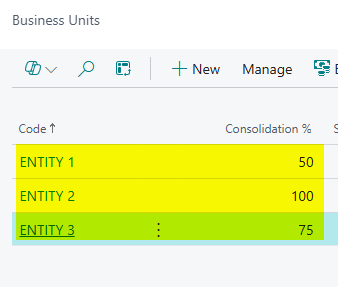
One simple way to record and recognize these relationships is to use Business Units to create a non-transactional snapshot of those entities. In Business Central, Business Units can be setup without any actual connection to the other entities. They can be used as a simple record recording the percentage of ownership using the consolidation % field like so:
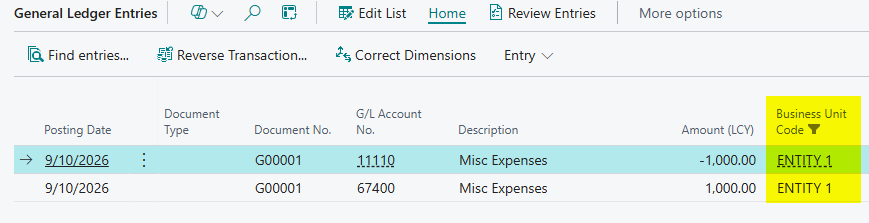
This also has another benefit. While I mentioned that this is strictly a disclosure requirement, you can record journal entries with a business unit code. This means you don’t need an intercompany partner or even a dimension. You can post journals and then report on and analyze your general ledger by Business Unit:

In the general ledger entries page you now have a value you can sort, filter, and report with:
All of this data can be pulled into reports or used as a reference.
Statistical Accounts for Disclosure:
Another great way to manage these relationships and record the non-transactional component in Business Central is with Statistical Accounts. This feature was added so that Business Central users could track and report on supplemental information in financial reports. It’s a powerful tool that I find end users aren’t always taking advantage of. Statistical accounts work similarly to standard GL Accounts and can even work with your dimensions. There are many different ways to implement these, for example in my screenshot below I am creating one account per Entity on my Statistical Accounts page:
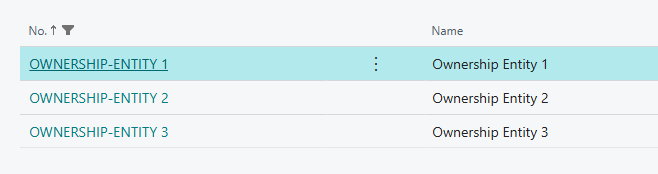
I could also just create a single account called Ownership and then use a dimension to track my entities. But no matter the approach you take, once you have your statistical accounts configured you can then post statistical journal entries from the Statistical Journal:
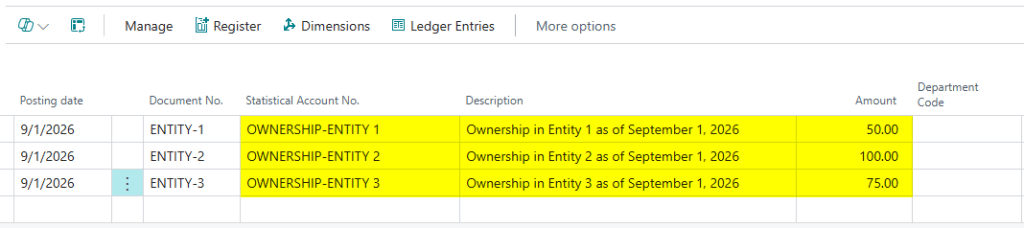
You can see in my journal I have ownership entered by entity which happens to be each account. You can also see I have my department dimension, but this journal works with all dimensions if they are in use. This allows you to create a dimension for entities instead. Once the journal is Registered then you can see on my statistical accounts page I have updated ownership percentages:

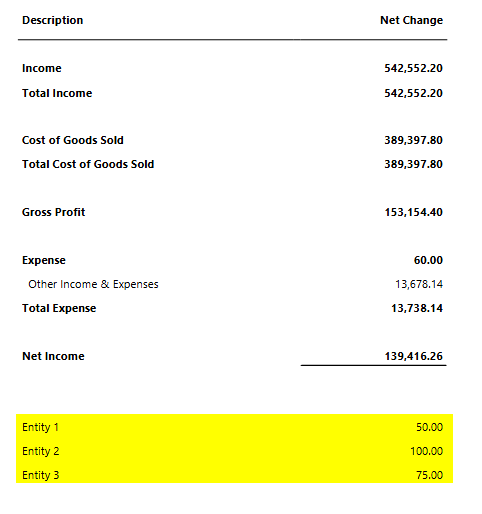
These can then be tracked in the Statistical Ledger, or I can even add these to my financial statements, below is a basic example of an income statement with disclosures for ownership added to the bottom:
Challenge 2: Officer/Employee Payables and Receivables
Another common challenge is transactions involving officers, employees, or affiliated entities under ASC 850. Material Notes or Accounts Payable and Receivable arising from transactions involving those entities must be presented separately on the Balance Sheet. They cannot be grouped under standard Accounts Payable and Receivable accounts. Simply using a Dimension for filtering is not sufficient for external financial statements because the balance sheet lines themselves must split.
Customer and Vendor Posting Groups:
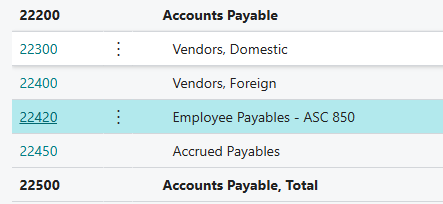
The disclosure itself can be done as seen above but in order to record these activities accurately on the Balance Sheet you need to use Customer and Vendor Posting Groups. Let’s say an employee is owed significant material balance. In Business Central this employee can be setup as a vendor and assigned a Vendor Posting Group that is linked to a GL Account on my Balance Sheet. First, I can setup a Payables account:
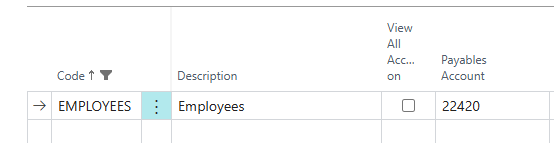
Then I can setup a Vendor Posting Group that uses that G/L Account:
Then I can assign that to my employee (vendor) record and even use that vendor record to track information about the relationship, and even attach any important documents:
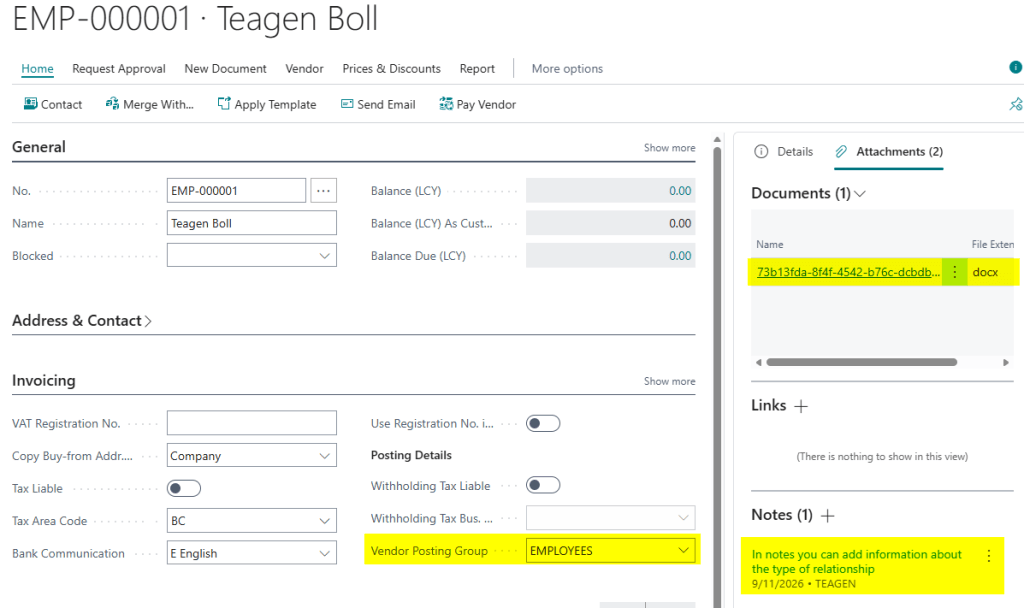
Any journal or document posted against that vendor will then flow to the appropriate account on the Balance Sheet separate from standard Accounts Payables. The same process could be applied on the Customer side. Alternatively, some users also take advantage of the Employee module in Business Central which works much like a vendor card. I still prefer using Vendor’s to keep everything in one place but that’s not required.
Challenge 3: Carrying Value of Assets Under ASPE 3840
When an asset is transferred between entities under ASPE 3840 and that transaction is not part of the normal course of business, then, under ASPE it’s required that the subsidiary record the asset at the historical carrying value from the other entity. Let’s take a scenario where Entity 1 has purchased Land for 150,000$. Now, Entity 2 is looking to buy this land for 200,000$. This transaction is a transfer of ownership and not part of regular business. The difference must be written off to Equity, and it must not be recorded as a Gain or Loss in Net Income.
With Business Central’s intercompany module there isn’t really a clear way to manage this transaction. Instead, what needs to be done on sales and acquisition is the following journal entry in the Fixed Asset G/L Journal:
Selling Entity:
The selling entity needs to record a contributed surplus on the Balance Sheet:

In this scenario they are receiving 200,000$ in Cash but they can’t recognize that gain on the Income Statement. Instead, we can record a journal that credits Contributed Surplus and keeps this gain on the sale in the Balance Sheet.
Purchasing Entity:
In Entity 2, the purchasing entity, the same journal entry needs to be created but the signs are reversed:

The journal entry in the fixed asset g/l journal is nearly identical, but it’s treated as an acquisition, and the “signs” are flipped.
As well, you can also assign dimensions to these entries as needed. For an intercompany transaction you could also have an intercompany dimension attached to both those journal entries which can then be used for reporting purposes.
Challenge 4: Multi-framework Measurement and Tracking
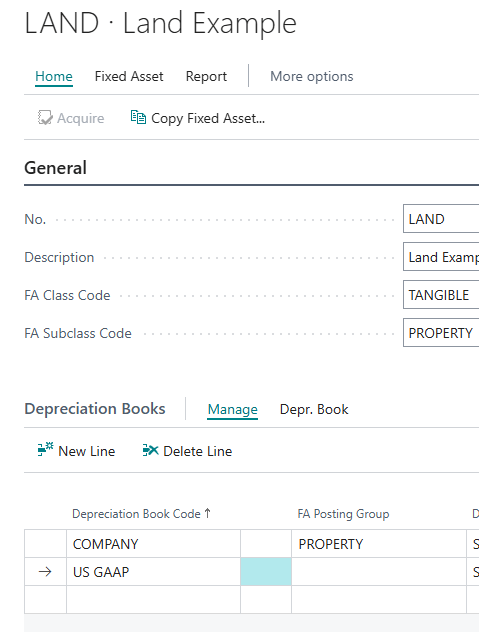
Another issue that can arise is there could be the requirement for a company to track both the ASPE historical value and the US GAAP value. To handle this in Business Central, assets can be setup with multiple depreciation books, a standard “COMPANY” book and a “US-GAAP” depreciation book that can be used for informational and reporting purposes.
Continuing with our scenario above. I can take that LAND asset and add an additional depreciation book to it:
I can then post a Fixed Asset Journal (not a Fixed Asset G/L Journal) to record the US GAAP value of my asset:

On my Fixed Asset I can now see both values:
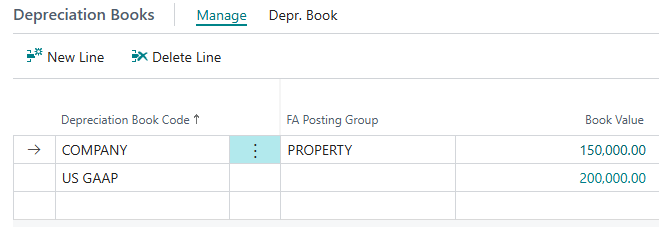
These can then be used in reporting and in the case of depreciable assets (not Land) you can also record depreciation in Business Central automatically for both at Month and Year End.
Closing Thoughts
Ultimately, related party transactions are more than a disclosure exercise, they require a non-financial transactional record and there’s many tools at your disposal to manage these records. Whether you are complying with ASC 850 separate balance-sheet presentation rules, managing disclosure of ownership under IAS 24 or navigating the carrying-value write-down complexities of ASPE 3840, Dynamics 365 Business Central has the tools to keep your ledgers accurate. By taking a proactive approach to Posting Groups and dual-depreciation books, corporate Controllers can save time during year end close and during audits.


Leave a Reply