I previously covered basic Revenue Recognition here: Basic Revenue Recognition in Business Central Using Standard Sales processes – Business Central CPA. But what happens when a business also offers a warranty for any services or products? Warranties are a very common and important part of any ongoing business. As with any process you usually find there are strict rules and some considerations for tracking and reporting warranties. These also vary based on the nature of the warranty and the framework being implemented. For any companies using Dynamics 365 Business Central it’s important to understand the way that warranties can be managed in order to ensure financial records are measured accurately and disclosed appropriately.
As with other topics, the concept of warranty obligations within accounting frameworks does differ. The rules are governed under two IFRS sections: IFRS 15 – Revenue from Contracts with Customers and also IAS 37 – Provisions, Contingent Liabilities and Contingent Assets, two ASPE sections, three US GAAP sections, ASC 450 – Contingencies, ASC 460 – Guarantees and ASC 606 – Revenue from Contracts with Customers, and it should be noted with ASPE we will use standard operating accruals.
Why does it Matter?
If a company is offering warranty but isn’t disclosing a liability and provision for those warranties, then that company’s financial statements aren’t accurately reflecting the future state of earnings. There’s an expectation of estimation of costs related to any warranty offerings that needs to be measured and recorded. Investors, shareholders, debt holders and other related parties need to know what potential liability there is and what provision has been set aside for any warranty claims.
Differences (or Should I say Similarities?)
As with revenue recognition, IFRS and US GAAP are closely aligned. They split warranties into two types:
- Assurance Warranties: These are warranties that provide a guarantee to a customer that the product or service outlined in the contract will work as expected. Assurance warranties are not a separate performance obligation which I explored in my revenue recognition article linked above. These warranties are accounted for under IAS 37 and ASC 450. Legal requirements, warranty length and nature of the warranty all factor into how a provision/contingent liability will be recorded. This will be the focus of this post.
- Service Warranties: If additional assurance is provided to a customer in the form of services beyond the mere assurance the service or good will work as expected, these will be treated as a separate performance obligation. These warranties are accounted for under IFRS 15 and ASC 606. Under IFRS the warranty is still assessed under IAS 37 to determine the treatment. They are then treated as a service with its own performance obligations and recognition.
ASPE takes a different approach and does not have any strict definition outlining the difference between assurance or service type warranties. In fact, ASPE doesn’t outline any performance obligations for warranties. If there is an extended warranty or an additional warranty service this is managed under ASPE 3400. Some reference is made to ASPE 3290, but it should be noted that under ASPE 3290.04 it states:
“While allowances for impaired loans and doubtful accounts (see FINANCIAL INSTRUMENTS, Section 3856), as well as non-discretionary vendor rebates and provisions for warranties, have many of the characteristics of contingencies, such estimates are not usually regarded as contingencies, and for the purposes of this Section are excluded.”
This means we just apply ASPE 1000 and that’s why we treat it as a standard accrual.
This article will focus primarily on assurance warranties. Overall, some of the key differences between IAS 37, ASC 450/460 and ASPE include:
| Framework | IAS 37 | ASC 450/460 | ASPE |
| Recognition Criteria | When outcome is more likely than not, which can be considered 50% or more. | When an outcome is likely to occur which can be considered 70% or more. | Not applicable in this case. The recognition is required as an accrual. |
| Initial Measurement | If there are a range of possible outcomes, measurement will be the midpoint of that range. | Per ASC 450, If there are a range of possible outcomes, measurement will be the lowest amount in that range. | If an estimated measurement can be determined, the minimum expected loss will be used. |
| Recording of Warranty | A warranty expense and a liability are recorded. | A warranty expense and a liability are recorded. | An accrued loss on the balance sheet needs to be recorded. |
| Discounting to Present Value | Mandatory if the time value of money is material. | Prohibited unless future payments are contractually fixed and determinable. | Generally prohibited / not practiced. |
| Terminology | Warranty Provision (Balance Sheet provision). | Accrued Warranty Liability (Balance Sheet liability). | Accrued Warranty Liability (Balance Sheet liability). |
Calculating Warranties in Business Central
In order to record a contingent liability in the case of ASPE or a provision/liability in the case of US GAAP and IFRS, we first need to calculate our sales. There are many ways to do this but one way I like to complete this task in Business Central is from the Item Ledger Entries using analysis views. You can either create these from scratch or ask Business Central Copilot to help with creating an analysis view. Let’s start by asking it to calculate all our Sales Shipments in the month of January in 2026 with Item No. as a subtotal:
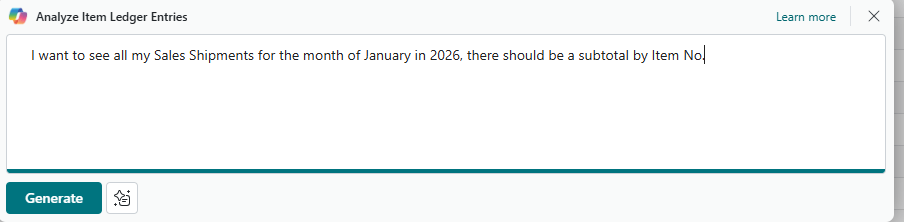
You can see with a simple prompt I can then see all my shipments made over the month of January 2026 which will be important for calculating our warranty/contingent liability and provision:
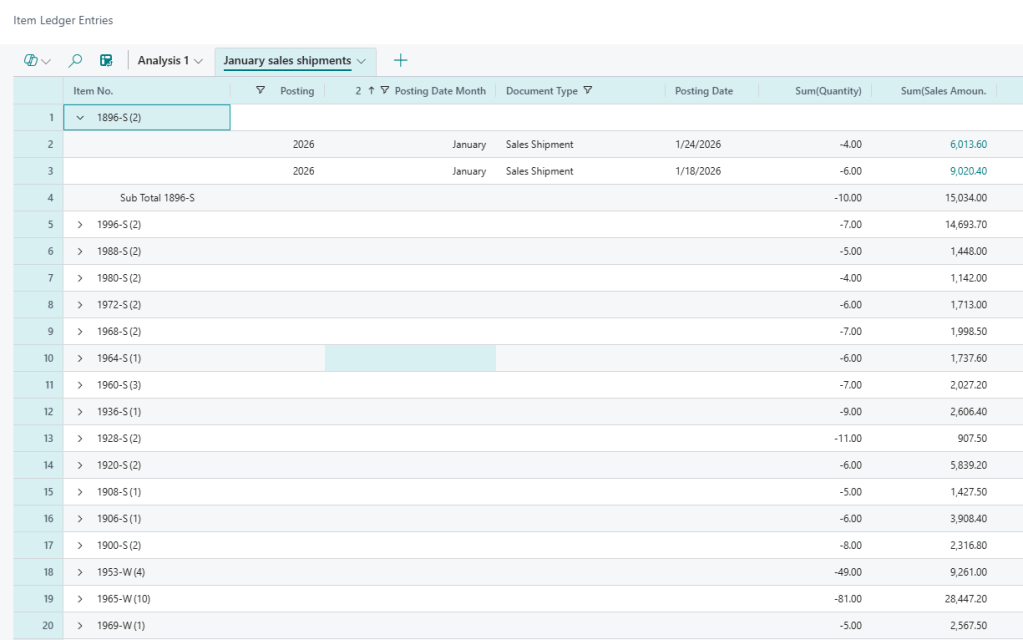
There is a simple calculation used in financial analysis that can help us calculate our required provision or liability, it can be broken down as:
Warranty Liability = Expected Units Affected x Expected Cost per Claim
To get our expected units affected we need to base this on historical warranty claims. You can use the same copilot analysis tools to determine how many units were sold in the same period a year earlier (or a prior month) and then calculate how many were returned as a percentage to get an expected units affected. The potential cost per claim should also be reviewed on a recurring basis.
Using the data above, let’s say all those items are under warranty with the same historical claim rates and expected units to be affected. We can get totals from our analysis view in Business Central:
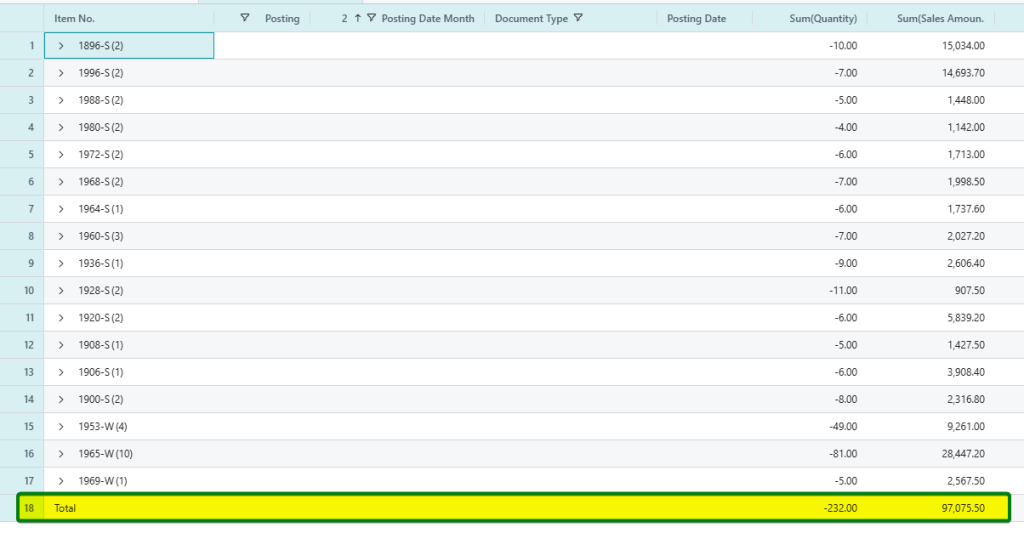
We have 232 units shipped and if we have a historical claim rate of 2.156% that would give us 5 units. I picked that percentage because it gives me a nice round number but, in your calculation, you shouldn’t round the unit calculation up or down. And I should note that the 2.156% is as close as it can get to a guarantee so that means the recognition criteria is met for US GAAP, IFRS and ASPE. We can take the items costs from the item card and add that to our analysis view:
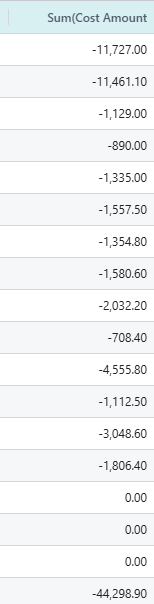
At 44,298.90 in costs with 232 units that can be estimated at 190.94$ per unit but this could be a range that would vary based on what units we expect to have warranty claims. Let’s estimate our range anywhere from 100$ to 200$ per claim. This is where IFRS, ASPE and US GAAP will diverge.
Accrual Entry
After calculating the cost above, we have some options for recording this in Business Central. There’s one gotcha that we have to be aware of. If we record the Warranty Expense and Liability and then a claim does come in, we want to make sure expenses and liabilities aren’t overstated. There’s really two ways to manage this in Business Central. First is using a reversing accrual and adjusting the amount and second, creating a product posting group for warranties that draws down the balance sheet account instead of COGS. Let’s look at both these in detail to see how they can be implemented.
Method 1: Reversing Recurring General Journal
This method is ideal for companies that do not want to change system posting setups or alter standard sales returns processes. Here, standard replacement sales orders are allowed to post through standard COGS accounts. Reversals offset this expense.
First, we simply create a recurring journal and then prepare a reversing variable entry like this:
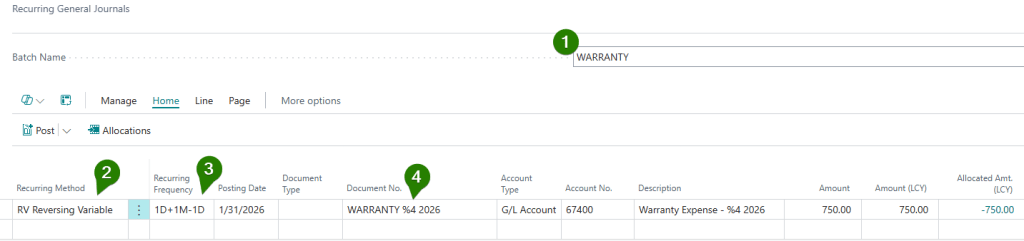
- I recommend creating a batch specifically for warranties.
- Set the recurring method as Reversing Variable as the amount is variable month to month. This recurring method automatically posts your journal entry on the last day of the month and then posts an exact credit reversal on the first day of the following month, bringing the balance sheet liability back to zero.
- Set the recurring frequency to 1D+1M-1D (one day plus one month minus one day). Avoid using just ‘1M’. For example, ‘1M’ from February 28th results in the next month being dated for March 28th, causing subsequent journal dates to skew. The ‘1D+1M-1D’ formula guarantees entries are always posted on the correct last day of each month.
- For the Document No. and Description, I’m also using a dynamic date value (%4 which = Month Name). For other placeholder code values, you can use the reference below:
- %1 = The day number of the period posting date
- %2 = The week number of the period posting date
- %3 = The month number of the period posting date
- %4 = The month name of the period posting date
- %5 = The accounting period name of the period posting date
- %6 = The fiscal year of the period posting date
For the amount field, we need to determine the range based off our Accounting Framework and use the appropriate calculation:
- ASPE: Under ASPE we use the lowest range of the estimate which is 100$ so the calculation would be 500$.
- IFRS: Under IFRS we would use the expected value or midpoint of the range which is 150$. This is the amount in our example above of 150$ per unit or 750$ total.
- US GAAP: This would follow the same logic as ASPE and use the lower end of the range and in this case, it would be 500$.
After entering my recurring line, I enter the amount and then I assign the Allocations account:
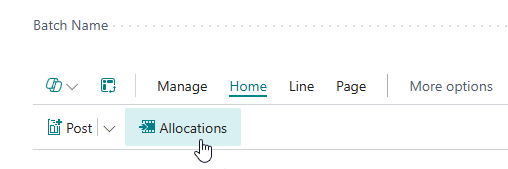
Then allocate to the appropriate account:

The posting of this entry will show an accrual at month end and a reversal 1 day after the posting because of our recurring method:
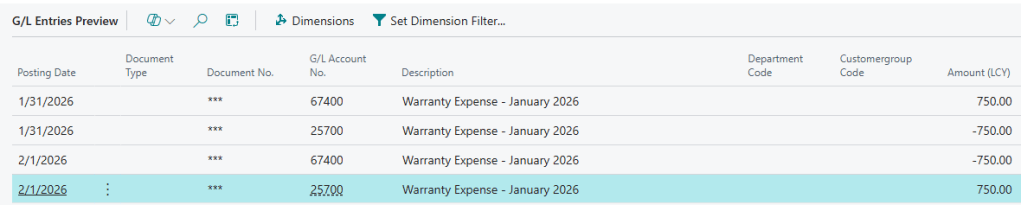
The result is the expected warranty journal entry of:
Debit: Warranty Expense
Credit: Accrued Warranty Liability (ASPE and GAAP)/ Warranty Provision (IFRS)
The journal entry will then have to be appropriately posted every month where the total units sold up till that fiscal period is calculated and the warranty claims are subtracted if there are any. This means in February we would post an accrual of the 750$ less any warranty claims plus the new warranty calculation for February. See a rough example below where my February 2026 month end has an accumulate warranty expense and liability/provision:

Method 2: Using a Product Posting Group
As an alternative you can post a journal entry using the same method above but don’t use a reversing journal entry. Instead, you can setup a recurring journal for a recurring method of Variable. Once posted, we don’t need it to reverse because we are instead going to draw down the warranty liability account using a product posting group.
In order to take advantage of this method you need to setup a Product Posting Group called WARRANTY that could be used on sales orders for warrantied items. In the General posting setup this product group could have the COGS account set to the balance sheet account for warranty liabilities/provisions:
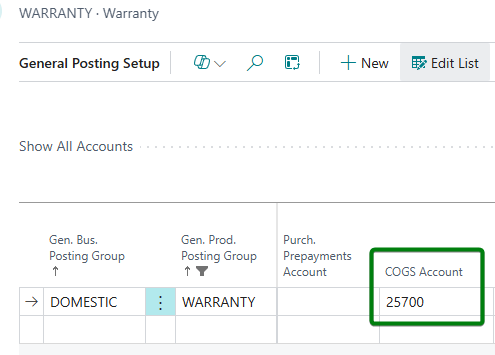
Then when you create a Sales Order for that warranty, the General Product Posting Group could be changed on the lines to the warranty group:
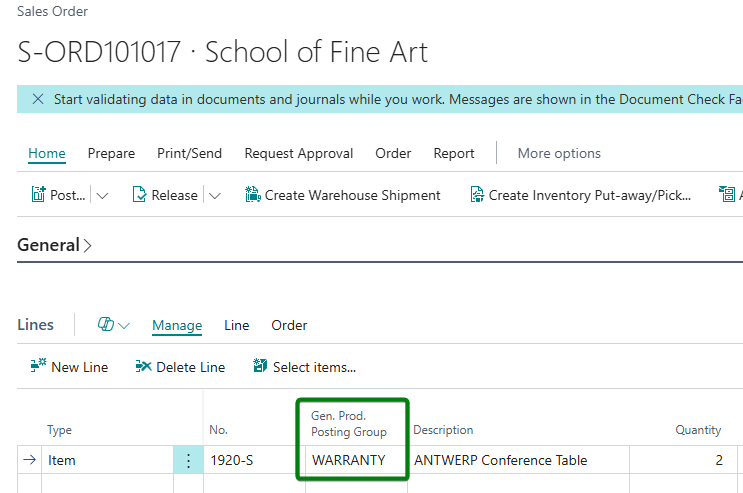
On posting this will “draw down” the warranty liability/provision account instead of double posting to the income statetment:
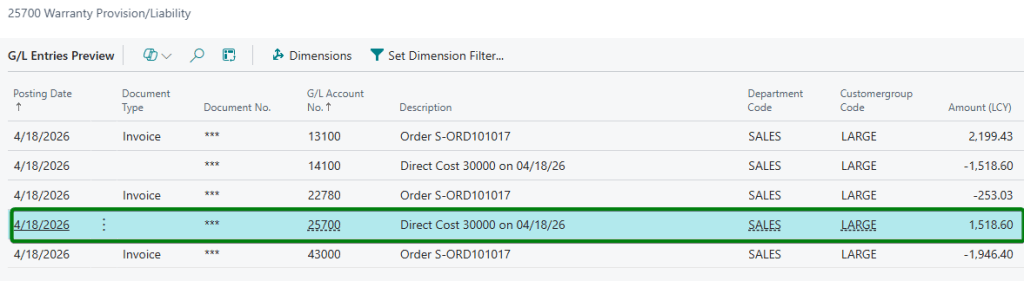
As soon as that new item is sent to the customer the warranty liability/provision is appropriately reduced and there is no double posting to expenses. This helps save time with calculations but there is the caveat that users need to change the posting group correctly.
At the end of each month, you then simply record the warranty liability/provision for just that month.
Other Differences Between Frameworks
There are other ways the frameworks diverge. One of these is under IFRS, if this is a subsequent year-end entry. IFRS outlines criteria for Interest Accretion in order to get the discounted present value but only if this is a material amount. In many cases it wouldn’t be, but you would need to post a journal entry that takes our 750$ and calculates a discount rate, let’s say it’s 8% and then this gets added to the Warranty Provision account. The journal entry would be:
Debit: Interest Expense (750$ * 8%)
Credit: Warranty Provision (750$ * 8%)
Closing Thoughts: Bringing Systems and Standards Together
Auditors don’t just look at the journal entries you post; they test the integrity of the processes behind them. Leaving your warranty accounting to disconnected Excel sheets and manual COGS offsets is an open invitation for audit adjustments. Transitioning from the theoretical frameworks of ASPE 3290, ASC 450/460, and IAS 37 to a system-driven approach in Dynamics 365 Business Central doesn’t just mitigate the risk of overstating expenses, it establishes a robust, defensible control environment. Aligning your ERP’s General Posting Setup with your framework’s specific recognition rules ensures that when the auditors ask for your warranty reconciliation next year, the system has already done the heavy lifting for you.


Leave a Reply