Overview
Revenue recognition is one of the key parts of any business. At the end of the day, it’s what all for-profit companies are trying to increase. There are rules surrounding how revenue can be recorded and this article focuses specifically on Canadian Accounting Standards for Private Enterprises (ASPE), International Financial Reporting Standards (IFRS) and US Generally Accepted Accounting Principles (GAAP), reviewing how they diverge and how these frameworks can be captured in Business Central using Standard Sales processes.
Criteria for revenue recognition can be found under IFRS 15 – Revenue from Contracts with Customers, ASPE Section 3400 – Revenue and US GAAP ASC 606 – Revenue from Contracts with Customers. There are moderate differences between the way each framework outlines the criteria for recognition criteria.
Differences
When it comes to the different frameworks in Canada and the United States, IFRS 15 and ASC 606 are closely aligned for most criteria but there are moderate differences between those two frameworks and ASPE 3400.
| Topic | IFRS 15 | ASPE 3400 | US GAAP – ASC 606 |
|---|---|---|---|
| Core Concepts and Recognition | 5 step method for the recognition of revenue with comprehensive guidance. | Judgement based recognition when performance obligations are met but less prescriptive than IFRS and GAAP. | 5 step method for the recognition of revenue similar to IFRS 15. |
| Collectibility Threshold | Collectability threshold of 50% certainty before revenue can be recognized. | Recognition rules are less stringent but occurs when persuasive evidence of an arrangement exists, delivery has occurred and sellers’ price is determinable. | Requires a higher probability of collectability with a threshold of 75-80%. |
| Variable Considerations and Constraints | Variable consideration requirements for discounts, credits or other events that could impact revenue. Recognized either at expected value or likely amount. | There aren’t any constraints related to considerations for events that could impact revenue. These events are just recorded when they are reasonably measured and collection is assured. | Similar to IFRS 15 there is variable consideration requirements for scenarios where revenue could be impacted. |
| Financing and Long Term Components | If financing is required, then the transaction price has to be adjusted to reflect the time value of money when delivery is over 12 months. | There is no requirement for adjusting transaction price or considering time value of money based off financing or long-term contract components. | Closely aligned with IFRS 15 where financing components need to be recognized based on time value of money. |
| Impairment Loss Reversals | Previously recognized impairment losses on contracts can be reversed if conditions improve. | No criteria related to impariment of revenue and contracts except as outlined in general ASPE impairment standards. | Unlike IFRS 15, impairments can not be reversed if conditions improved. |
Recognition of Revenue in Business Central
As IFRS 15 and ASC 606 both use a 5-step method and ASPE 3400 has less guidance outlined, the below section will cover each 5 steps as they can be implemented in Business Central if we are to use standard sales processes in Business Central which includes Quotes, Orders, Invoices and Credit Memos.
While there are other ways to manage and recognize revenue such as in Projects this article will focus specifically on the Sales module including a sale of goods and a sale of services.
Step 1 – Identification of the Contract
In Business Central’s sales module the simplest way to identify that a contract exists is by creating Sales Quote, Order or Invoice. Simply following the Quote to Order to Invoice process can signify there is a contract. But there is generally more to it than that at a conceptual and functional level. Most end users in Business Central aren’t going to only create a document in their ERP when they know there is some contractual obligation. There may be some records in a CRM portal or a written document or even email requesting goods.
When I review this with Business Central users’, I start by determining if they are selling either goods or services. In either case you typically start with a Sales Quote created in the system but in the case of either scenario you could start with a Sales Order or for services a Sales Invoice.
In Business Central this is simple as navigating to the Sales Quote page and selecting +New and then populating the quote with the appropriate information:
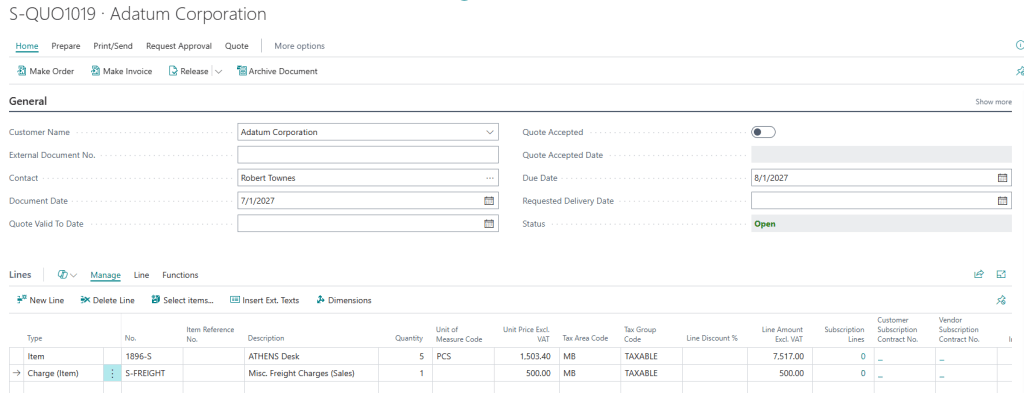
This quote would be the first stage of the contract identification stage. In this case the company creating the quote will identify the goods and services being sold (usually at the request of the customer), the payment terms, potential dates and other parameters.
Once those are determined and discussed with the prospective customer it can be sent using standard tools within Business Central under the Print/Send submenu:
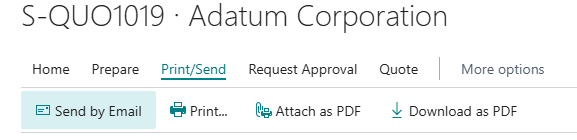
Business Central also has a useful feature available for Sales Quotes where once there is acceptance from the customer you can set a quote as accepted:
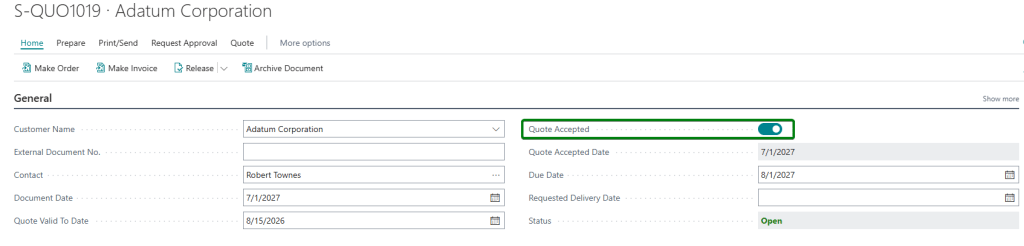
This should be treated as a marker for when the customer has accepted the terms of a contract and we can consider the identification of the contract completed. The next step would be to convert the quote to an order:

In many cases the steps above can even be skipped such as if a customer is sending a request for an order or if you have a contract for services where a Sales Invoice would be more appropriate. This is where you need to determine your business process and then implement it in Business Central appropriately.
Step 2 – Identification of the Separate Performance Obligations
It’s important to note that performance obligations are distinct deliverables under IFRS and US GAAP. Within ASPE we would not need to consider separate performance obligations. Under ASPE we just determine the risk and rewards during the transfer of ownership.
In Business Central this is easily done by having all the performance obligations on a contract such as delivery of goods, services, shipping or other line items simply split onto separate lines in a sales document.
In the case of a sale of products that may include shipping costs, you could have a quote converted to an order following the example above:

I have two lines on my Sales Order but under IFRS and ASC 606 this would really be a single performance obligation because the ownership of the desks won’t change until they are shipped.
In another scenario you could be selling a software subscription, licensing or a support package on an annual basis. In this case you could have the following lines on a Sales Invoice:

For this scenario you would have two separate performance obligations given that licensing and support can be bought separately and billed separately and aren’t packaged together.
While those are two scenarios there are all kinds of different ways that performance obligations in a contractual agreement/sale can be recorded in Business Central. Using standard sales documents really just scratches the surface of basic scenarios.
Step 3 – Determining the Transaction Price
Business Central has a full sales pricing module which can make transaction price determination simple. But when it comes to longer term contracts and sales this can get a bit more complicated. Selling goods in the short term based on an agreed quote and having a clear pricing list helps reduce this risk. Comparing accounting frameworks, when we are determining a transaction price, there needs to be variable consideration recognition for both IFRS and US GAAP whereas for ASPE that isn’t the case.
In our examples we won’t consider any variable consideration, this is something I will explore in a later blog post. Other things to look out for are financing arrangements or areas where there isn’t a principal agreement on just what will get paid which can often come up with time and material type work.
For our simple example Business Central has built into it a best price available approach. This means on any give Sales documents, the lowest price will be selected based off the below steps:
- Check the bill-to Customer field and look if there is a Customer Price Group or Customer Disc. Group:
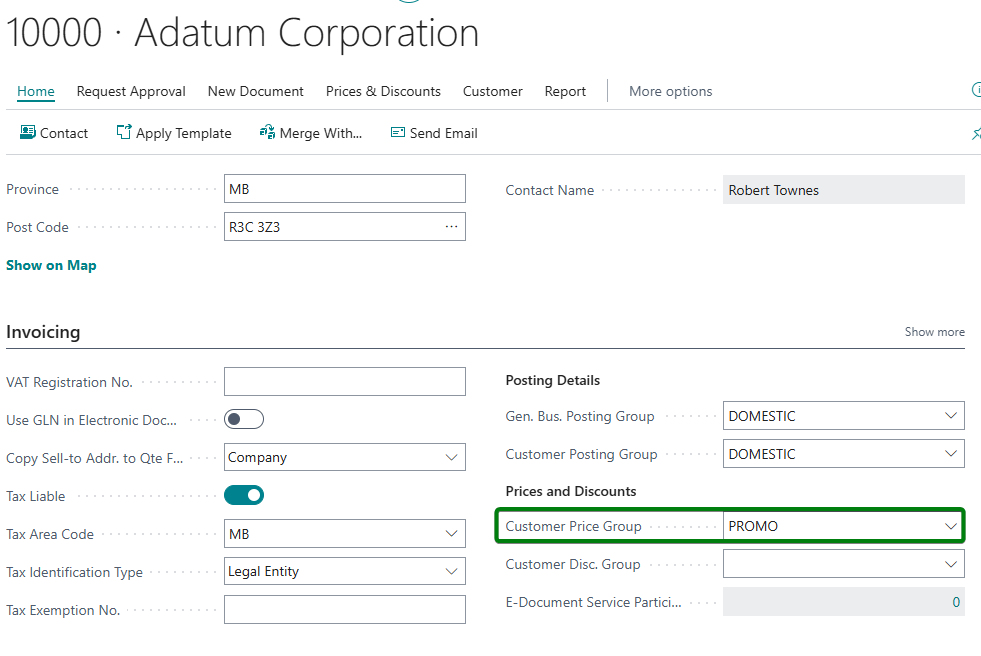
- If there is a group assigned, for Invoices and Credit Memos check the document header posting date and for other documents such as sales order the order date is checked. This date needs to fall within the boundaries of the Start Date and End Date of the price list and have a matching unit of measure:
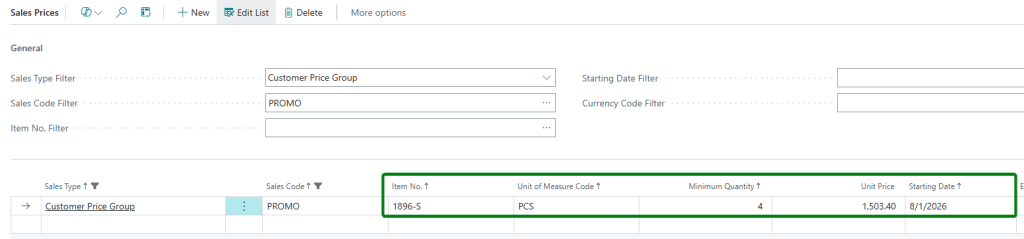

Because of that promo price list falling within the documents posting date the price is applied from that list as it’s the best price available.
Step 4 -Allocating the Transaction Price to Performance Obligations
After establishing the performance obligations and the pricing for each, next is to determine how pricing should be allocated to obligations. In our ongoing scenarios this is actually quite simple. For our desks we have a freight charge. The freight charge needs to be allocated across all the units evenly. In Business Central this can be done with item charge assignments:
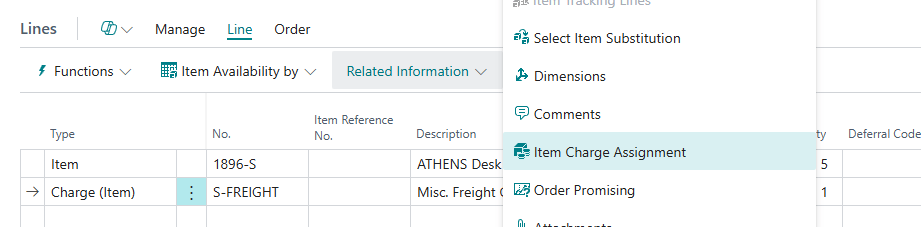
From there the item charges can be assigned to the inventory evenly. If more items were being shipped such as chairs, this could be assigned by weight or volume:

In regard to the services on the sales invoice those performance obligations have a set price that is allocated specifically to those lines.
Step 5 – Recognize Revenue When Performance Obligation is Satisfied
Lastly, the recognition of revenue needs to be completed. In the case of our desks this would be once our obligation is satisfied which is after the product has been shipped. Business Central has 3-way matching built into it so this can be done directly from the Sales Order by entering the quantity that has been shipped:

In the scenario above we are acknowledging we have shipped 3 units and want to invoice 3 units. Revenue is then recognized on posting. A partial amount of the line amount will be recognized, and the remainder will be unrecognized until delivered. You can see how the sale is recognized from the value entries in Business Central:

In the case of the sales invoice scenario, the first line is a month so all the revenue can be recognized. There are 10 licenses as well, each of those is a separate obligation and would need to be provided for the month. For the support subscription this is a 12-month obligation and could take place over multiple fiscal periods, in this case it needs to be deferred over those 12 months.

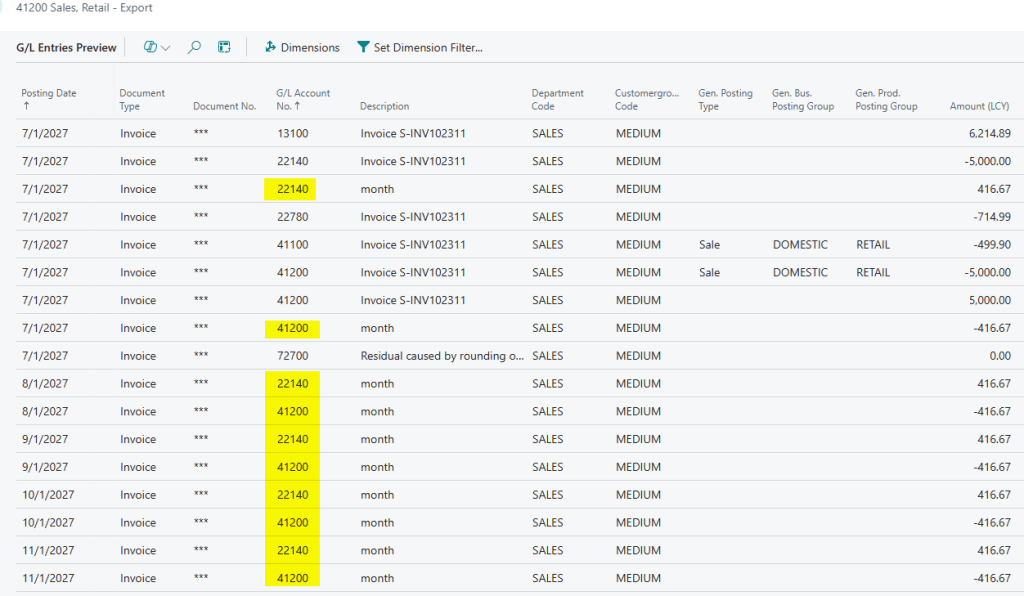
Business Central has a deferral module built into it that can be used for this exact scenario. The deferral code is set and then revenue can be allocated equally over a period, pro-rated, manually assigned and more. In the case of this support subscription it’s equally assigned with revenue recognized at period start.
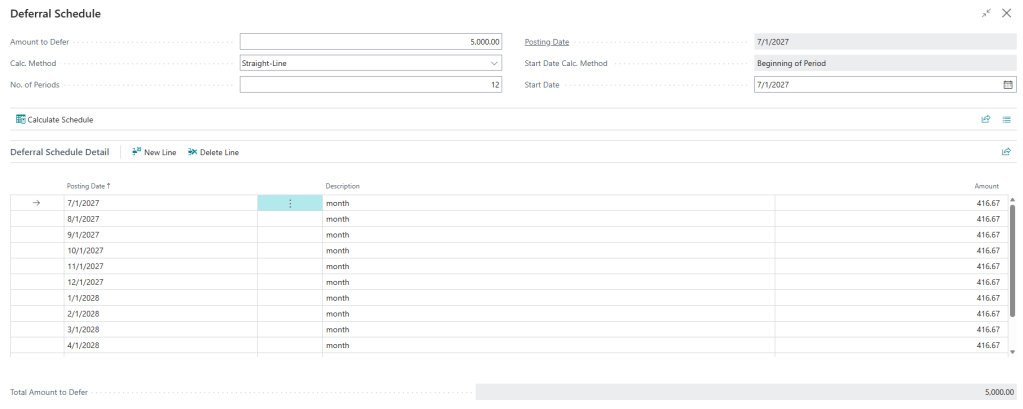
On posting the revenue will be automatically recognized and posted for those posting dates. This way we can ensure that performance obligations are met appropriately:
Closing Remarks
Revenue recognition is an extremely vast topic. This article really is meant to introduce it as a topic and outline how basic processes in Business Central can be used to implement revenue recognition principles from the onset of a contract being created to performance obligations being satisfied. IFRS, US GAAP and Canadian ASPE are all easily covered at a base level just using standard sales documents, item charges and deferrals. In other blog posts I will explore the deeper implementations of more complex guidelines within those frameworks such as variable considerations from discounts or warranty obligations.


Leave a Reply